Host sets land time · everyone LANDS together · farther SEND first
--:--:--
Game clock UTC
Rally timer
Step 1 team → Step 2 distance → Step 3 rally time → Final: Save
Rally sender: pick Hit together or Stagger hits below. Joiners follow YOUR land times and only add distance. Joiners (loadout-only) never set land.
How your rallies hit
Rally sender: pick Hit together or Stagger hits. Joiners follow this. You can change it anytime on Timer or Orders.
Seconds between each hit
Wave 2 lands this many seconds after Wave 1. Wave 3 after Wave 2 by the same amount. Tap a time, or pick any second below.
How stagger hits work
Each team is one wave. Wave 1 lands at your land time. Wave 2 lands later by the gap you pick (30s, 1m…). Wave 3 later still. Add another team for the next wave.
Inside a wave, everyone still lands together — farther cities SEND first (SEND = that wave’s land − your march). Joiners still arrive before that wave’s rally starts.
Pick what each wave sends. Troop types follow the Game you set under My Profile (Kingshot infantry/cavalry/archers, Whiteout infantry/lancer/marksman, Grand Gangster War Thug/Biker/Gunner/Bomber, and so on).
Use stagger when you want rallies to hit one after another (drain a garrison, keep pressure). Leave Hit together on if everyone should land at the same second.
How do you want to run rallies?
Novice: 4 guided squares. Expert: free order — use Timer / Orders yourself.
Novice setup · 4 squares
Tap one square. When that section is done you get a ✓ and return here — then do the next square. Squares never stack on each other.
1
Do #1 firstBuild who joins + troops (Orders).
One square at a time. Finish it, check appears, pick the next.
Expert mode: the 4 squares are hidden. Use Orders + Timer fields freely, then Lock & share when ready.
Joiner steps
Step 1Follow hosts & groups you join for
Step 2Open board order → lock heroes + troop mix (what to send)
Step 3Copy loadout into Kingshot · join the rally in-game
Step 4Watch Out for your group · no path times for joiners
Start by following a host below, then open their order on the alliance board.
Rally target (where you’re sending)
Optional but helpful: city name and/or coords of the land mark so allies know where this rally is hitting.
In your game: tap the city (or castle) → the panel shows X:… Y:… and the city name. Type those numbers into Target coords here (and the name if you want).
Step 1
Select team
Same Save for both modes: pick team · distance · rally time · Save all. Both hit the same target at the same land time.
Step 2
Distance to the other target (march clock in game)
As leader you set the in-game rally time (above). Your own distance to the other target is the same number for everyone: the clock above Deploy in Kingshot. Type H/M/S here — the app calculates when you Deploy.
Distance to the other target
Your SEND (rally time you pick): —
Hit Deploy / SEND in
—
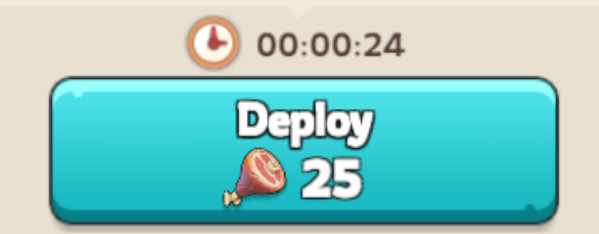
In your game: open the target → copy the march duration clock (example 00:00:24) into this app as distance to the other target.
Step 3
Your rally time
Pick in-game rally time✓Drafted
Or pick time
h
m
s
This rally’s in-game rally time: —
View: —
Lock the host order for heroes + troop mix, then join that rally in Kingshot. No path or host land times.
“In-game rally time” is when you press SEND. LAND = that time + your path. Example: rally in 10m + path 5m → you SEND in 10m, land in 15m.
Final step
Save team + distance + your rally time
After Step 1–3 are filled, tap Save so this phone keeps the team, your march, and the shared land time.
Fine-tune
Countdown to your SEND
--:--:--
Select team · distance · rally time · Save all · then Lock & share
Events & ops
Event type, join open, fill/RSVP, and multi-sender order — separate from the numbered send steps.
GET READY alert before SEND
How early phones warn “open game” before SEND. Used when you Lock SEND & share (step 3).
Pick the Kingshot event, then open-in so join-by = when it unlocks. Each type sets gather length, slots, and tips.
Tips & FAQ · heroes for this event
Community consensus from public Kingshot guides (2025–2026). Meta moves by generation — check your gen’s widgets. Not official Century Games docs.
Fill & RSVP
0 / 15 (0%)
Send group · shared land
Host sets one rally time — everyone LANDS together. Each person enters distance. In game pick the leader’s rally length (not distance). Ready = Lineup · envelopes = Deploy
Tap the city you are rallying → copy the clock number above Deploy (example 00:00:24) into this app.
Rally leader only: set shared land / rally time + Orders groups → Lock & share
You: open the target in game → copy march time above Deploy → type H/M/S here
All distances in (or leader Boots on Lineup) → SEND clocks · everyone LANDS together · phones alert when to Deploy
If you started the team, your rally time is when everyone SENDS. They only enter city march. In game they pick your rally length (Xm) — that is not their distance.
1
Who goes · troops
Set this step here
Set who joins and troop mix on Orders. When finished, this step checks off.
Only you pick when the wave lands (Host land UTC). Your march is the clock above Deploy in Kingshot — same as every multi-sender.
Tap the city you are rallying → copy the clock number above Deploy (example 00:00:24) into this app.
If you start the team, only you set rally time — everyone who joins follows it. Every sender also types their own distance. Everyone SENDS at that time. In game pick the rally length the leader chose — that is not distance.
Optional: pick GET READY lead on Events & ops tab, then lock here.
Wave is armed when step 3 completes. Multi-sender board is on Events & ops.
Friends (any alliance)
Add allies from Chat (+ Friend). When you Lock & share, they get a push with your name and join path collect like your alliance.
Who gets these orders
Assign people to each team on Orders. Lock & share → they get a Rally order for their team. Empty teams → whole alliance.
Refresh members, then uncheck “everyone” to pick people.
Follow · order codes
Follow hosts & groups
Follow hosts you wave for. New orders ask for your city→target march (senders only).
Follow hosts you join. Orders show heroes + troop % — no path numbers.
Tap groups you fill so waves with those names auto-lock for you.
How your rallies hit
Hit together (default): everyone LANDS at the same second. Farther marches SEND first (SEND = land − your march). SEND waits until your senders are Ready. Send envelopes — do not start the clock alone.
Seconds between each hit
Wave 2 lands this many seconds after Wave 1. Wave 3 after Wave 2 by the same amount. Tap a time, or pick any second below.
How stagger hits work
Each team is one wave. Wave 1 lands at your land time. Wave 2 lands later by the gap you pick (30s, 1m…). Wave 3 later still. Add another team for the next wave.
Inside a wave, everyone still lands together — farther cities SEND first (SEND = that wave’s land − your march). Joiners still arrive before that wave’s rally starts.
Pick what each wave sends. Troop types follow the Game you set under My Profile (Kingshot infantry/cavalry/archers, Whiteout infantry/lancer/marksman, Grand Gangster War Thug/Biker/Gunner/Bomber, and so on).
Use stagger when you want rallies to hit one after another (drain a garrison, keep pressure). Leave Hit together on if everyone should land at the same second.
Leader delay (shared). Each person types distance only. #1 longest march SENDS first — 2, 5, or more all land together.
Share codes · by team
Each card is one team. Sender code = path / SEND clock. Joiner code = heroes + troops only (no path).
Post codes in Chat (Chat sub required). Alliance gets sender + joiner codes. Server/World get sender codes only.
Completed log
When a tracked SEND / outgoing rally finishes, it is logged here. Clear anytime.
Alliance board · hosts’ rallies
Share your host times. Other senders add their march; joiners only pick team / join in-game.
Alliance board: who is sending, target hit times, and how long left to join before the host rally leaves.
Join by setting Player ID, alliance, and server under My Profile.
Orders · teams
Fill Team 1 below · + Add another team only if you need more
One team is ready to fill — assign people + troops. Tap + Add another team if you want more waves. Then Lock & share / envelopes.
Paste a joiner code or open a shared order — you only need heroes + troop mix. No distance.
Hit together = same land time. Stagger hits = waves (later teams land after a gap) · pick what each wave sends. Solo team hits = no in-game rally · leader delay · distance only.
Seconds between each hit
Wave 2 lands this many seconds after Wave 1. Wave 3 after Wave 2 by the same amount. Tap a time, or pick any second below.
How stagger hits work
Each team is one wave. Wave 1 lands at your land time. Wave 2 lands later by the gap you pick (30s, 1m…). Wave 3 later still. Add another team for the next wave.
Inside a wave, everyone still lands together — farther cities SEND first (SEND = that wave’s land − your march). Joiners still arrive before that wave’s rally starts.
Pick what each wave sends. Troop types follow the Game you set under My Profile (Kingshot infantry/cavalry/archers, Whiteout infantry/lancer/marksman, Grand Gangster War Thug/Biker/Gunner/Bomber, and so on).
Use stagger when you want rallies to hit one after another (drain a garrison, keep pressure). Leave Hit together on if everyone should land at the same second.
Leader delay (shared). Each person types distance only. #1 longest march SENDS first — 2, 5, or more all land together.
Troop amounts as
% = chips or slider · Troop # = # / K / M then a number.
Fill Team 1 · assign people · set troops · Lock & share
Need a second wave? + Add another team. One team is enough for most rallies.
Send order to people
After you make orders, send to the whole alliance (instant) or offer to the server (they Accept first). You can also pick players. The list includes alliance members and names you typed onto a team.
Save My Profile, set up teams and land times, then you can send.
Whole alliance gets the envelope right away. Whole server only gets an offer — they tap Accept on Rally ✉ before it becomes their order. Or pick players from the list.
Server: they must Accept. Alliance: they get the order immediately.
Nobody listed yet. Add people onto a team, or wait until allies save in-game name + alliance + server under My Profile.
Game you play · Kingshot
Game you playKingshot
Presets, heroes, and troop types below are only for this game. Timer and SEND work the same for every game.
Defending your city? Use the City tab for hit times and reinforce shares.
Your March presets
Presets saved on March. Apply to a team here, or Open to edit on March.
Same target · same land time
Everyone aims for one land time on the same coords. Green = in sync. If staggered, fix path or delays.
My orders
Envelopes sent to you — tap to open · unread count drops as you read them
Type is on the envelope (Hit together · Stagger hits · Solo). Tap to open — nothing to copy or paste.
Deploy · envelopes
Envelopes · cancel · Ready/Boot = Lineup
Share envelopes and cancel the wave here. Ready on target and Boot live on Lineup only.
Cancel this live wave for everyone — or open Cancel to pick several teams.
Share envelopes
Mid-wave ping only — opens the same send picker as Orders. Ready on target is on Lineup.
Lineup · Ready on target
Ready on target · still missing · Boot · everyone LANDS together
Only place for Ready on target and Boot. Everyone LANDS together · farther SEND first. Envelopes are on Orders / Deploy.
My times
Your distance only · host rally stays locked
Leader rally time is shared by everyone who joined this team. You only edit your march distance — LAND = host rally · SEND = land − your march.
Alliance members
Everyone in your alliance · Just joined is marked here, not in My Orders
Check names, then Host (they put distance) or Support (heroes + troops). New joiners show Just joined here — not in My Orders.
Whale Destroyer
Same target · same land · invited only
Same target · same land · team picks + envelopes only
Set the hit target and land time. Whale lists people leaders put on teams, or anyone you sent envelopes to — not the whole server.
Put your march / travel time from the game — YOU SEND = land − that time · everyone lands together.
Server hit target
One land time for the whole server — everyone SENDS so marches arrive together.
Simultaneous rallies
Same land time as the whale hit. Add one slot per rally that hits together — pick which alliance gets the order, who leads, troops and heroes. Save presets on this tab.
Invited hitters
Only people leaders picked on a team, or sent envelopes to. Tap a name to mark them again for envelopes.
Send envelopes
Mail someone to invite them onto this Whale list — ✉ marks selected names. Pick a Whale rally, then Send envelopes or Share envelope in Chat. Sender = distance · Joiner = heroes + troops.
Save My Profile, set up teams and land times, then you can send.
Server: they must Accept. Alliance: they get the order immediately.
Nobody listed yet. Add people onto a team, or wait until allies save in-game name + alliance + server under My Profile.
Cancel rally
Batch cancel hosted waves · Out keeps one-tap cancel
Only waves you published. Tick the teams you want to stop — teammates get notified and Rally envelopes for those waves clear.
My City · under attack
1 Hit times → 2 Reinforce waves → 3 Share
Log when enemies land on your city, then pick who to send reinforce orders to (same people list as rallies). They get a phone alert with your city coords.
Leaders plan hits here · open reinforce orders from Timer.
Hit times on my city
Enter when enemy marches land on your city (UTC). For each hit, choose reinforce before, at, and/or after. People who reinforce must enter distance (time to get there). Delay vs the hit is added on top of distance.
No city hits set · add times above
Reinforce orders
After hit times create waves, assign players and share so invited allies get the reinforce order.
Troop amounts as
Who gets these orders
Check names the same way as rally envelopes. Share and Send go to the people you pick — not the whole alliance unless you Select all or Send to whole alliance.
Save My Profile, set up teams and land times, then you can send.
Whole alliance gets the envelope right away. Whole server only gets an offer — they tap Accept on Rally ✉ before it becomes their order. Or pick players from the list.
Server: they must Accept. Alliance: they get the order immediately.
Nobody listed yet. Add people onto a team, or wait until allies save in-game name + alliance + server under My Profile.
No reinforce groups yet — add hit times and tap Make reinforce orders.
Map
1 Search → 2 Pick → 3 Save pin
Search or save player and alliance coords for your current game and server. Each game keeps its own pins.
Type a player name, alliance, or coords — results stay on this Game + server
Save / update location
Name + coords required. Same name/ID overwrites on this Game + server.
Incoming attacks
Hits on your city — defend from My City
Hits you log on My City, plus reinforce orders with city coords. Pick who to send the same way as rallies.
Outgoing rally/troops
Live outgoing feed · Cancel tab for multi-select · Rally ✉ for envelopes
Waves you host (you can cancel), plus orders sent to you. Open Rally orders for envelopes.
Same target · hit together
One land time · SEND order is slow path first.
Group Ready · Deploy armed · alerts on
Set a time on Timer first
Game you play · Kingshot
Game you playKingshot
Presets, heroes, and troop types below are only for this game. Timer and SEND work the same for every game.
March · loadout
1 Heroes → 2 Troops → 3 Save preset → use on Orders
Pick heroes + troops, save. Use on Orders.
Locked orders fill heroes + troops here.
Your team
Saved march presets
Pick any saved team loadout to edit. Save under a name — Orders lists every preset on each group.
Select heroes
Tap names to add or remove.
Pets
Filter by type for this game (Utility = eco/build · Combat = war). Tap to add or remove.
Boosts for this march
Mark what to activate before SEND.
Troop types for this team
Troop amounts as
% = tap a percent chip or drag. Troop # = pick # / K / M, then a number (250 + K = 250,000). Save team — Orders reuse this preset.
Level · amount (or Troop #).
Infantry · Cavalry · Archers · Siege
Tiers T1–T12
Usually 3 hero slots
Total 100%
View: —
Saved teams
Alerts
1 Turn on alerts → 2 Pick voice → 3 Stay for SEND
On by default: GET READY then SEND NOW.
Mac: system push may not reach you. Keep Raids Timer open — a full-screen SEND popup will fire at time.
Get Raids Timer for MacSame timer as this site. Mac alerts keep working when you switch apps.
Rally joiners: no personal Deploy / SEND alerts — lock host order for heroes + troop %, join in game. Reinforces that need a march will still prompt you.
GET READY alert before SEND
Host picks 1m, 3m, or 5m. Shared on Lock & share so allies get the same ready window.
GET READY 1m before SEND
What plays
Voice says SEND NOW. Pick a sound below if you use sound.
Alerts on
My Profile
1 Player ID + server → 2 Name → 3 Save (needed to share)
Player ID + server + name for chat and sharing — not a phone number.
Phone alerts
Off — alliance pings and SEND will not reach this phone until you turn them on.
Game you play
Pick the game you are playing. Change it anytime here (More → My Profile), or on March / Calcs. Each game keeps its own heroes, troops, and presets. Timer and SEND work the same.
Active game:Kingshot · Change anytime: More → My Profile
Chat identities · this Game
Chat uses the active Game chip + your server. Save multiple names per game and server, pick which one this phone uses, or delete a name you no longer need.
Active game:—
Orders will not work until you fill out your info (in-game name, alliance, and server).
Profile photo
Shown in chat next to your screen name and server.
?
Muted & blocked in chat
Mute hides their messages. Block also stops their chat pushes to you. Manage from any chat message, or here.
Muted
Blocked
Optional. If you save coords here, they go on the Map directory for your Game + server so others can search your name or coords.
Skip wait (optional)
Off by default. Turn this on only if you want a timer that Releases people who never enter distance. Pick who, Send order, and the rest of the app stay clean unless this is on.
How long they have to enter distance before they are Released and skipped off the team. Only applies when you have more than 5 teams. A 2-person wave never skips.
Language · role · mode
Language
App labels in this language.
Default rally role
Senders enter march distance. Joiners never enter path time — they only join rallies.
How your rallies hit
Rally sender: pick Hit together or Stagger hits. Joiners follow this. You can change it anytime on Timer or Orders.
Seconds between each hit
Wave 2 lands this many seconds after Wave 1. Wave 3 after Wave 2 by the same amount. Tap a time, or pick any second below.
Rally mode
Novice = guided steps. Expert = free layout around the timer.
Chat rooms: World · your server · your alliance.
Chat membership
Locked · $1.00/mo · rallies free without Chat
Raids Timer
Optional · cancel anytime
Unlock Chat
Timer, My times, Lineup, Orders, City / reinforce, Calcs, Map, and Rally ✉ envelopes stay free. Chat (~$1/mo on iOS) adds rooms, multi-name identities, envelope share in Chat, auto-translate, pin share, and Auto Farm — the farmer that runs on a Windows PC and in BlueStacks.
Free vs Chat
In-app purchase · Chat · 1 month auto-renew · billed by Apple
What’s included in Chat
Optional App Store subscription. Timer, Orders, Calcs, Map, and SEND alerts stay free.
World · Server · Alliance rooms (1 alliance room per tag)
Chat rooms for alliance talk · World hit call (coords + alliance)
Share / open Rally ✉ envelopes in Chat rooms
Multiple identities per Game + server · profile photo · name · server on messages
Auto Farm — the farmer that runs on a Windows PC and in BlueStacks
Friend and alliance messages, like Discord, plus optional popup notifications
Screen record and live feed while you farm, then save a clip or send it to your YouTube channel
Calcs
Pick your game, then pick a tool
Offline helpers for your active game. Community estimates — always double-check in-game.
Active game · suite switches when you pick:—
Game · —
Tips and Events
Pick any game we set up. How to play, a searchable list of every named event (tap a name for the full notes), and rally packs. Fan notes — recheck live UI after patches. Does not change the Game saved under My Profile.
Game you play
How to play
Listed events
Search a name. Tap a name to read everything on that event. Rally packs are below.
Rally packs
Auto Farm
PayPal Chat plan. Unlock once. Windows: right-click the helper tray → Auto Farm (BlueStacks). Linux: run linux-farm.sh, Launch Waydroid, then Record / Play on the helper. Same Chat unlock. Helper banners can Send order and count down GET READY / SEND when your alliance shares a wave (same board as this site; Chat plan not required for that). Record and Play stay on the helper so you can use the game without keeping this site open.
Auto Farm is part of the same $1 / 31-day PayPal Chat subscription (or App Store Chat on iPhone).
How to use
Pay for Chat (PayPal). Same plan unlocks Auto Farm.
Pick the game you farm in (same list as My Profile). Troop names, map pins, and setup clicks follow that game.
Windows: after Chat is unlocked, right-click the helper tray → Auto Farm. Pick the same game. Record and Play are on the helper.
Open the game on this PC. On the helper: Record, Play, Loop, Save, queue, days of the week.
How to use on the helper is in your language (same language you pick in the app). Record taps, name it, Save.
Play runs saved farms top to bottom. Loop or Times repeats. Escape or right-click stops.
Phones cannot click the game.
Pictures: Mag glass, drag a box, then Add to farm. Play waits until that picture is on the screen, clicks it, then the next recorded click. Or tick Hit any picture.
Messages and Record & share are the other tabs. Screen recording does not stop Farm. Both can run at the same time.
Friends are people you marked Friend in Chat. Alliance members are commanders who saved the same alliance and server.
Tap a name on the left. Their thread opens on the right, one person at a time, like Discord.
Type a message and Send. It goes to that person as a private chat.
Turn on Popup notifications if you want a pop-up when a new message arrives in the chat you have open. The browser asks once.
Pick a friend or an alliance member
How to use Record & share
Paid Chat only. Tick Enable record and share before you start.
Open the game on this PC or in BlueStacks.
Start screen record and pick the game window or the whole screen. The live feed shows in this tab.
Switch to the Farm tab and press Play. Farming keeps going while this tab records.
Stop when you want a clip. Save clip downloads the video on this PC.
Paste your YouTube channel if you want. Send clip to YouTube downloads the clip and opens YouTube upload so you can put it on your channel. Open YouTube live opens your channel so you can go live with that same screen.
Download
Downloads are grouped iOS, PC, and Linux (Mac and the website stay below). Getting orders, rally timers, and the normal Raids Timer functions are FREE. Auto Farm (record and play) is the paid part — Chat / PayPal plan. Same Chat unlock follows you. Windows: double-click pc-banner.cmd (BlueStacks). Linux: run linux-farm.sh (Waydroid — BlueStacks has no Linux build). iPhone / iPad: App Store; Auto Farm is not on iOS.
Orders, rally timers, and the rest of Raids Timer stay FREE. Auto Farm (record / play) needs a Chat plan (PayPal or Apple).
Helper 1.0.200 records clicks and keys, then Play runs a numbered list. Pictures wait until they are found, then click. Save BlueStacks size + location. 2–12 BlueStacks screens, each with its own play list and pictures. Split view tiles 2–4; five or more (or more than this PC can run) farms one screen at a time. Hide helper tucks the window — reopen Auto Farm from the tray. A WARNING names RAM / CPU / disk before you open many screens.
Desktop shortcut Raids Timer Chat uses the app icon. If Windows still warns: More info then Run anyway.
Installs helper 1.0.200, opens Auto Farm, this website, and BlueStacks. Orders and rally timers stay FREE; farming is the Chat / PayPal plan.
Same helper as Windows PC: record clicks and keys, numbered play lists, wait-until-found pictures, saved size + location, 2–12 screens, split 2–4, one-at-a-time if more, per-screen lists and pictures, Hide helper, hardware warnings.
Orders, rally timers, and the rest of Raids Timer stay FREE. Auto Farm (record / play) needs a Chat plan (PayPal or Apple) — same unlock as Windows PC.
BlueStacks has no Linux version. Use Waydroid. Keep linux-farm.sh next to linux-farm.py, then ./linux-farm.sh. Launch Waydroid, Find windows, Use window, Record / Play. Split 2–4; five or more farms one screen at a time.
Heroes
Portrait · skills · what they’re good at. Pick a game. Community guides — recheck in-game after patches.
Each hero: photo, skills, what they’re good at, how to get them, rally / garrison / joiner notes. Pick your game below (same Game as My Profile / March). Public-guide summary — not official skill sheets.
Game you play
Support
Ask for a game, or tell us an app problem. The owner reads these privately.
This is not alliance Chat. Leave a message — no password needed to send.
Owner inbox (password)
Only the app owner. Type the inbox password to read messages.
Help
How to use Timer, Orders, in-game rally length, SEND, and City reinforce
How to do everything
Find any screen: the bottom bar is Timer · Teams · More (plus the SEND clock on iOS). Tap More to pull up a tile grid — Orders, Rally, Lineup, Deploy, Alliance, In, Out, Map, Alerts, My Profile, Chat, Calcs, Tips, Heroes, Help, Support, Share. Tap a tile; the grid closes. Help is in that grid.
First launch: fill in-game name, Player ID, server number, and alliance name. If you skip any, alliance mates cannot see you and you cannot use alliance chat.
Then More → Help → Interactive how to (also opens after setup). Replay anytime.
Find screens: bottom bar is Timer · Teams · More. Tap More for a grid of every tab. Pick a tile — the sheet closes.
Pick your Game under My Profile (or March) so troop types match.
My Profile: keep that profile saved (server · in-game name · alliance · Player ID).
March / Teams: heroes + troop mix → Save preset.
Orders (leader): fill Team 1 · Lock & share / envelopes. Rally team hits: no delay — rally time + distance only.
Solo team hits: no in-game rally — leader delay only; every attacker (2, 5, or more) types distance only; #1 longest march SENDS first.
Timer: leader sets shared rally time (when everyone SENDS). Each sender enters distance.
In game: pick the rally length the leader chose (1m / 5m / 15m…). That is not your distance.
City reinforce: enter distance to the city. Optional delay vs the hit is extra. SEND = hit + delay − distance.
SEND alerts wait until every sender on the team has distance (or Boot / Release).
Deploy: envelopes · cancel the whole group the leader started. Open from More — it does not stay on other screens.
Alerts: GET READY → 15s warning → SEND NOW.
Joiners: join in-game before the rally starts — never delay the rally clock.
Leader cancel stops the whole group they started.
Team leaders · SEND rules
After you enter your distance, stay in your game on the rally with your finger ready to push Send / Deploy.
SEND notifications wait until everyone on your team has entered distance (or you Boot / Release them on Lineup).
The app gives a 15 second warning first. That is only a heads-up — do not send yet.
The next popup is SEND NOW. Press Send in-game immediately with no delay.
Joiners must not delay your rally time. If someone joins late and the in-game rally clock resets or stretches, the wave will not hit the target together.
Cancel order stops the whole group you started — every team on that land, teammate SEND, and Rally envelopes.
Live kingdom / alliance / KvK stats and gift codes on Jeabslist (independent community tool — not affiliated with Century Games or Raids Timer). Open links in your browser; we only show active codes here.
Tap a code to copy · redeem in Kingshot Settings → Account → Redeem Code. Auto-redeem for rosters is on Jeabslist with your player ID — not in Raids Timer.
Event tips · heroes FAQ
Kingshot event rules + hero picks. Full portraits, skills, and “good at” notes are on the Heroes tab.
In-game events · tips
Phases, win rules, points, building scores, prep checklists. Recheck live UI — patches & kingdoms differ.
City · troops · gear · governor · tech
City buildings, troop tiers, research trees, hero gear & governor. Recheck live tooltips after patches.
1. Game + profile under My Profile
2. March preset → Orders Lock & share
3. Distance in → stay on rally in-game
4. 15s warning → next popup SEND NOW with no delay
5. Joiners must not delay the rally clock
Go to
Tap a screen — pull-up closes after you pick
Share Raids Timer
Tap an app. We copy the post and fill the compose box when that app allows it (X and Reddit). Discord and Facebook: tap the box and paste.
Raids Timer
Terms of Service · EULA
Before you continue, please confirm you have read and agree to the Raids Timer Terms of Service / EULA.
This app is a fan rally-coordination tool — not affiliated with Kingshot. Timers and alerts are informational only.
Optional Chat is an auto-renewable monthly subscription; prices by country are listed in the full Terms.
English · Español · Português · Français · Deutsch · Italiano · Русский · Українська · 中文 · 日本語 · 한국어 · العربية · हिन्दी · Indonesia · Türkçe · Polski · Nederlands · Tiếng Việt · ไทย
Tap your language first. Setup, Interactive how to, alerts, and FAQ then use that language. You can change it later on My Profile or this FAQ.
Which commander is this phone?
This device has more than one saved profile. Pick who you are using right now so orders and SEND stay on that name only.
You can switch later under My Profile. Only one name can send or receive orders on this device at a time.
Server updating · wait 5–10 min. Timer still works here.
Server updating
This app cannot talk to the backend at all. If we just pushed an update, wait 5–10 minutes. Timer, SEND, and calcs still work on this phone.
Delete this profile?
This name will be removed from this device. Orders will no longer use it here.
?
Player
Needed to chat with alliance members
Chat is unlocked. Add your in-game name, server, and alliance so you can talk with your alliance members.
Active game (from My Profile · Game chip):—
Alliance name is required to join your alliance room. Game is set under My Profile.
Your PC helper is out of date
This site can see the helper on this PC. Download the new helper. Farm saves, commander, and pictures stay. If the tray icon is running, it can also update itself.
Linux Auto Farm helper (Waydroid). Downloads grouped iOS / PC / Linux. BlueStacks is Windows/Mac only. Chat plan still unlocks Record / Play. Mac update stays in Downloads.
New heroes, events, and features will keep being added.
1 / 7
How this app times a hit
1 / 10
Welcome — set up your account
We’ll ask a few short questions, one at a time — server, names, and basic info — so the timer matches your Kingshot account.
Your server number
Player ID and in-game name
Alliance
The game you play
Whether you send marches or join
Turn on phone alerts so orders and GET READY reach this device
You can change any of this later under My Profile — including the game.
Active game:Kingshot
You can change this anytime: More → My Profile (or March / Calcs).
I usually…
Joiners never enter path times. Senders set land + march for SEND.
Start with Novice if you’re new to multi-player timing. Switch anytime on Timer or My Profile.
Server
—
Player ID
—
In-game name
—
Alliance
—
Game
—
Role
—
Rally mode
—
Looks good? Next we’ll ask to turn on phone alerts. Edit anytime under My Profile.
When someone sends you an order envelope
GET READY to send when everyone’s times are in
SEND when it is time to march
Tap Allow Notifications on this iPhone so orders, GET READY, and SEND reach this device.
Please fill this in to continue.
One more step
Turn on phone alerts
Tap Allow Notifications so this phone gets order envelopes, GET READY to send when everyone’s times are in, and SEND when it is time to march.
Send rally order
Rally host = team sender (puts distance). Support = joiners (heroes + troops only — no distance).
Who is Ready
Timer started
Everyone entered their times. GET READY to send — stay on the target city. When your phone alerts, hit Deploy.
Board: green ✓ Ready + march sec + countdown + UTC.
Mac often can’t depend on push — this popup is your SEND cue.
SEND NOW
Tap Deploy in Kingshot
Your send time is now. Switch to Kingshot and send the march.
Time to enter distance?
Pick how long they get to put in their march time. If they miss it, they are Released and skipped — they are not counted on the team.
Orders saved
Send this order now?
Send Rally ✉ envelopes now so people get the order on their phone. You can send to the whole alliance or pick names.
Send later: Timer → Lock & share, or More → Orders → Send order. Check names, then tap Send order.
Send order to people
After you make orders, send to the whole alliance (instant) or offer to the server (they Accept first). You can also pick players. The list includes alliance members and names you typed onto a team.
Save My Profile, set up teams and land times, then you can send.
Whole alliance gets the envelope right away. Whole server only gets an offer — they tap Accept on Rally ✉ before it becomes their order. Or pick players from the list.
Server: they must Accept. Alliance: they get the order immediately.
Nobody listed yet. Add people onto a team, or wait until allies save in-game name + alliance + server under My Profile.
Order
Open the envelope in the app — nothing to copy or paste.
Share envelope to chat
Posts a Rally ✉ envelope in the room. People tap the envelope to open the order (distance or loadout). Needs Chat subscription.
@mention in the room. Check the boxes to also deliver to their profile / alliance Orders tab (push).
This host’s rally
Your distance · city → target
Tap the city you are rallying → copy the clock number above Deploy (example 00:00:24) into this app.
Only the rally leader sets the shared land time. You only need the march time above Deploy in game — type that same H/M/S here. The app calculates when you hit Deploy and alerts you.